




1. The easiest way to register is to click on the following text link, which will take you directly to the registration page.YOU CAN REGISTER HERE
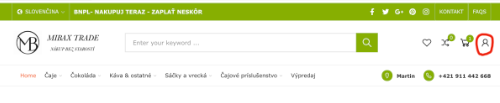
2. Before placing an order, click the red ICON in the upper right corner of the homepage or the text labeled MY ACCOUNT at the bottom of the page.

3. Shop at your leisure, add the items you wish to purchase to your cart, and proceed by clicking the CHECKOUT button. You will be redirected to a page where you will fill in all the required information marked with an asterisk. After entering your email address and password, an account will be automatically created for you. On this page, you can also complete your order and register and submit your order with a single click.
On your next visit to the online store, all you need to do is log in (enter your email address and password) and you can start shopping. After registering, you’ll be able to view the status of your orders, all invoices, track your Wish List, or edit your profile at any time.